![PlanetBids_Logo-Default.png]](https://training.planetbids.com/hs-fs/hubfs/PlanetBids_Logo-Default.png?height=40&name=PlanetBids_Logo-Default.png)
What are category codes?
Category codes are standardized classifications that describe the goods and services a vendor provides and the goods and services a solicitation seeks. They give the agency and its vendors a shared vocabulary, so the system can connect the right vendors to the right opportunities.
PlanetBids supports both standard code systems and agency-defined categories:
- Standard code systems: NIGP, NAICS, and SIC codes, etc. Each is an industry-recognized taxonomy for commodities and services.
- Agency-custom categories: categories the agency defines and maintains itself, each with an ID, a name, and an optional description.
Each agency controls which code systems are active for its vendors.
Why we use category codes
Category codes are the backbone of opportunity matching. They power several parts of the platform:
- Bid alert matching (primary use): when a solicitation is posted, the system matches it to vendor profiles based on their category codes and sends those vendors an email notification. Matching can optionally also consider licenses, location, and prequalification.
- Better discovery for vendors: vendors are alerted to relevant work instead of manually monitoring every posting.
- Better reach for agencies: agencies surface each solicitation to the vendors most likely to respond, which supports competition and outreach goals.
- Reporting and analytics: category codes drive reports such as Vendor Types by Category, which shows how many registered vendors fall under each category.
- Match transparency: where a match is explained, a matched category code can display its human-readable description so users understand why an opportunity surfaced.
- In Requests: In Making a Request, after the Requestor and Department fields, the user selects the relevant categories by searching and checking the box next to each one .
- In Contracts: Sort contracts by category to view spending trends.
- In Business Certifications: in Bench Certification, category codes are tied to each certification type. In Business Forms and Prequalification, the vendor’s existing registration category codes appear during review, and Prequalification uses category codes when a bid is created.
How category codes are used
Category codes touch three parts of the workflow: the agency maintains the list, vendors select the codes that apply to them, and solicitations carry codes so matching can occur.
Agencies: Manage the category list
Agency administrators maintain the category list in the Categories area, accessed from the Admin menu:
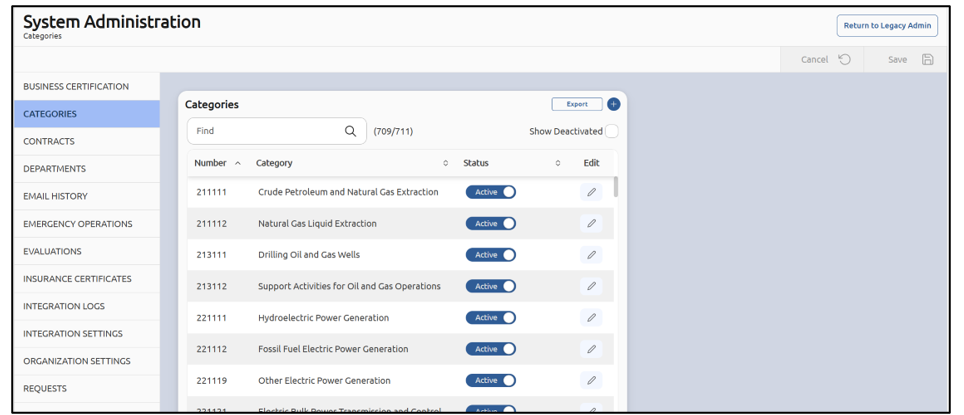
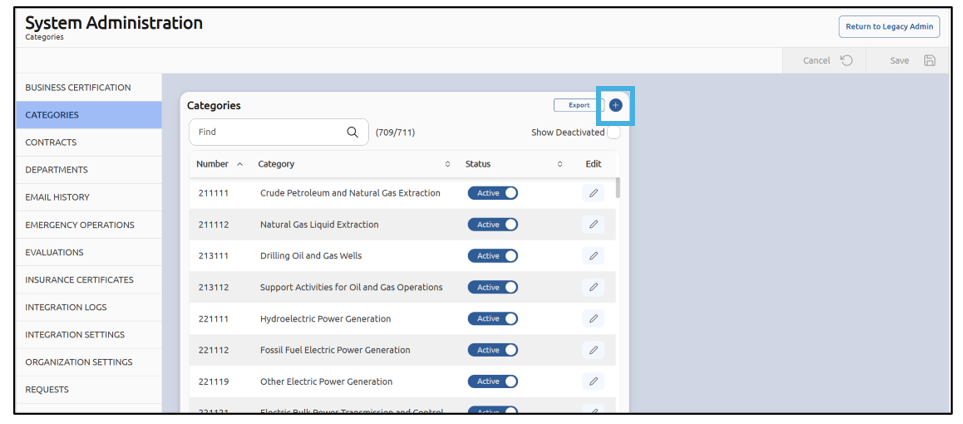
To add a category:
Select plus sign in the upper right corner:
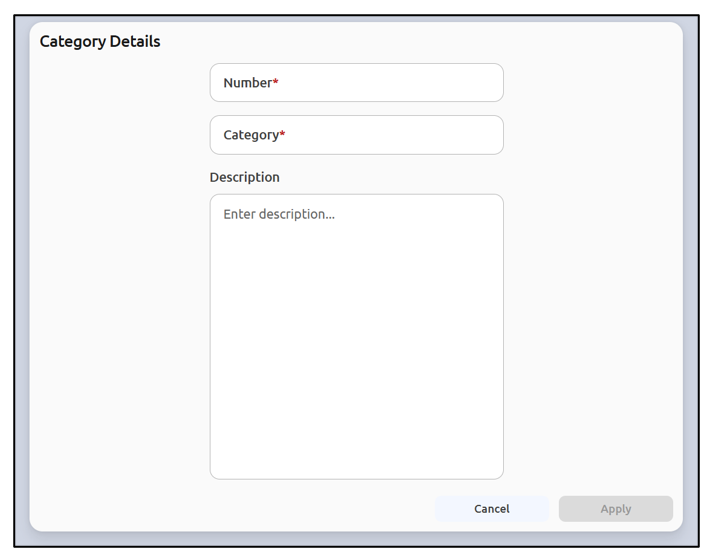
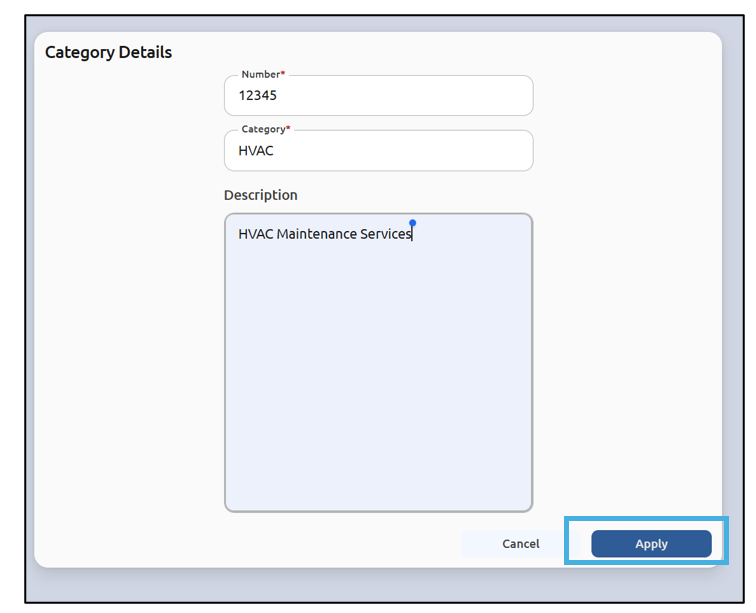
Enter a Number and Category (both required), and an optional Description:
Click Apply:
Then click Save:
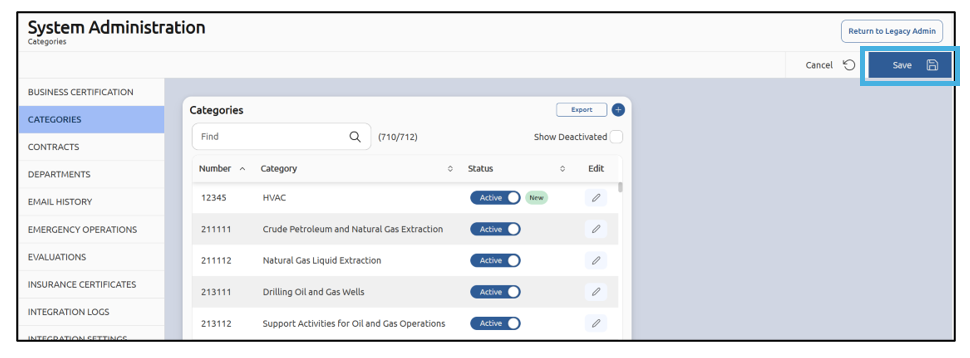
Administrators can also Deactivate or Activate a category. Deactivating removes it from future use without erasing history: a deactivated category cannot be added to new vendor profiles or bids, but it remains on existing bids and reports that already reference it. To activate or deactivate a category, use the slider bar under the status column:
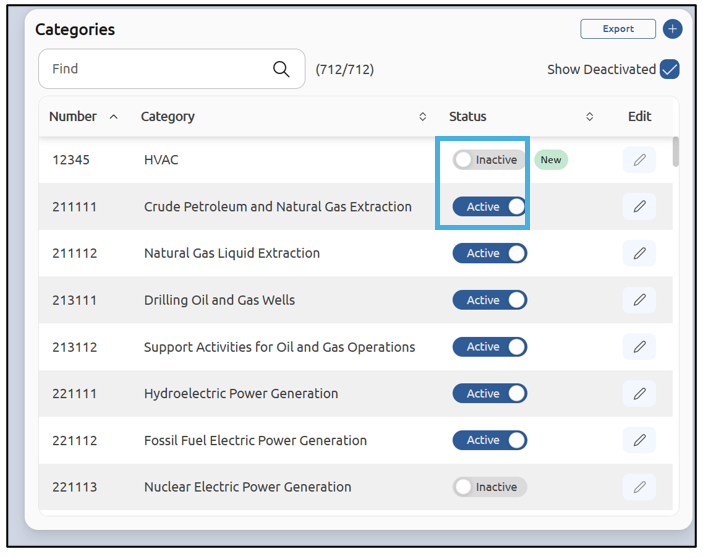
Note: If a category is deactivated, it is hidden from within the vendor's profile. Reactivate it, and it will reappear in their profile. No data is deleted.
Vendors: select the codes that apply
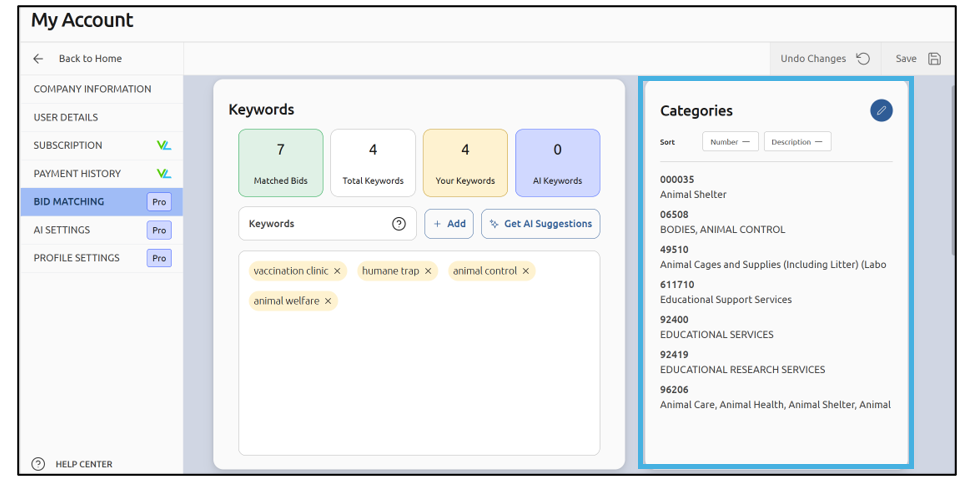
On their profile, vendors select the category codes that match the goods and services they offer, choosing from the code systems the agency has enabled. The system matches solicitations against these selections:
Solicitations: carry codes for matching
When a solicitation is created, it is assigned the category codes that describe the work. The system compares those codes against vendor profiles to generate bid alerts:

Emergency Operations: a separate category list
Emergency Operations uses its own list of emergency categories, so vendors can indicate the emergency goods and services they can provide. It works on the same principle but is managed separately from the standard category list. If you need a new code, email support@planetbids.com and let us know. We’ll add it to the master list.
Key behaviors to remember
- Deactivation is not deletion. Deactivated categories stay on existing bids and reports; only new use is blocked.
- The active code systems are agency-controlled. What a vendor can choose from depends on which systems the agency has turned on.
- Accurate codes drive relevant alerts. Codes that are too broad or mismatched produce noisier, less useful matches.